Here's a problem that sounds trivial and isn't: how do you draw something that has depth?
A pencil moves in two dimensions. Your screen is flat. Your mouse slides around on a desk that is, last time I checked, also flat. And yet the thing you're trying to build — a house, a kitchen, a chair — lives in three dimensions, with a front and a back and a stubborn insistence on casting shadows. Most 3D software answers this by handing you a cockpit's worth of controls and wishing you luck. SketchUp answered it differently, and that difference is the whole story.
So before we get into formats and price tiers and system requirements, let's talk about the one idea that made SketchUp a verb.
The trick: Push/Pull
Draw a rectangle. Now grab the Push/Pull tool, click the rectangle, and drag upward. The flat shape stands up into a box. Drag a number — type 3000 and it's three meters tall, exactly.
That's it. That's the move. It sounds almost too simple to matter, but watch what it actually buys you: you never have to think in 3D. You think in 2D — the part of geometry your brain already does for free — and then you extrude into the third dimension one push at a time. A wall is a line you pulled up. A window is a rectangle you pushed back through that wall. A staircase is the same move, repeated, getting bored.
Compare that to the everyman version of the alternative. An architect sitting down with traditional modeling software isn't drawing a house; she's specifying a house — vertex by vertex, in a coordinate system, hoping she didn't fat-finger a Z value. SketchUp lets her draw the floor plan she'd have sketched anyway and then stand it up. The conceptual distance between "what I'm thinking" and "what's on screen" collapses to almost nothing. That's why people who have never touched 3D software can build something recognizable in an afternoon.
Everything else in this review is commentary on that one decision.
What you're actually getting
Underneath the friendly surface, SketchUp is a real modeling tool with the features you'd expect a real tool to have:
- Interoperability: it imports and exports the formats the rest of the industry speaks — DWG, DXF, OBJ, STL, FBX and more — so it slots into a pipeline instead of trapping your work.
- Extensibility: the built-in Extension Warehouse hosts thousands of plugins, and there's a Ruby API if you want to write your own. Renderers, animation tools, terrain generators — the base app stays lean and you bolt on what you need.
- Components: build a door once, mark it a component, and every copy updates when you edit the original. Change one window; change them all. This is the difference between modeling a building and modeling the same window forty times by hand.
- Accurate measurements: every line, arc and angle takes a typed dimension. Push/Pull feels casual, but the geometry underneath is exact — which matters the moment someone has to actually build the thing.
- The 3D Warehouse: a giant, community-filled library of free models. Need a sofa, a tree, a specific model of toilet? Someone has already made it and uploaded it. You drop it in and move on.
- Google Earth / Maps integration: pull a real-world location in as context, so your building sits on its actual site instead of in a white void.
There are two companion apps worth knowing about. LayOut turns your 3D model into 2D documentation — dimensioned drawings, title blocks, presentation sheets, exported to PDF. Style Builder lets you restyle how the model looks, from clean technical linework to a loose hand-sketched feel, which is genuinely useful when you want a client to react to an idea instead of nitpicking a render that looks too finished.
The interface, and why it stays out of your way
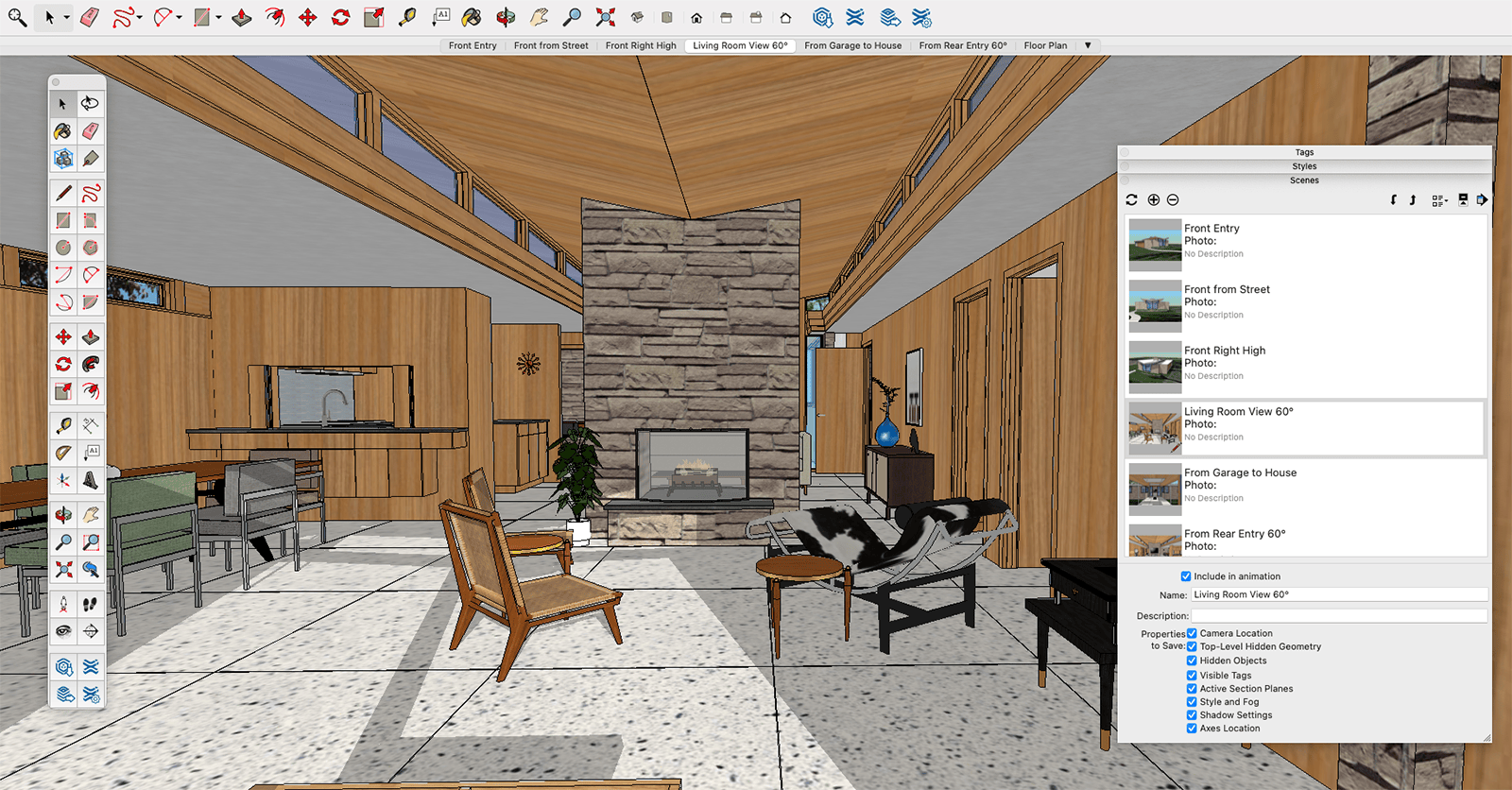
Open SketchUp and the biggest thing on screen is empty space — the modeling window, where the work happens. Around it: a menu bar up top (File, Edit, View — the usual), a toolbar of core tools (Move, Rotate, Scale, Push/Pull) on the side, and a set of trays on the right holding Materials, Components, Styles and Scenes.
The status bar along the bottom is quietly the most important strip of pixels in the app. It tells you what the current tool expects, and — crucially — it's where you type those exact dimensions. Tool feels loose and intuitive; status bar keeps it honest.
The toolbar is yours to rearrange: add icons, remove them, build custom tool sets, bind shortcut keys to the tools you reach for most. None of this is required to start. All of it is there once "start" turns into "do this forty times a day."
 SketchUp UI
Installing it (and what your machine needs)
Go to sketchup.com, hit Download, pick Windows or macOS, run the installer, agree to the terms, click Install. A few minutes later you're modeling. There's no ceremony here, and that's the point.
The numbers that matter are the system requirements, because this is where "it runs fine" quietly becomes "why is everything stuttering." The published minimums:
- Windows: a 1 GHz processor, 4 GB RAM, 500 MB of free disk.
- macOS: a 2.1+ GHz processor, 4 GB RAM, 500 MB of free disk.
Notice those are minimums, and they're modest enough to be slightly misleading. SketchUp will technically launch on 4 GB of RAM the way a car will technically drive on a spare tire. The component that actually decides whether your experience is smooth or miserable is the graphics card — SketchUp leans on the GPU to push all those faces and edges around in real time. A 3D-class card supporting DirectX 9.0c or above isn't on the "minimum" line by accident; it's the part that turns a slideshow back into an interface. If models feel sluggish, look at the GPU before you blame the software.
Performance: fast until it isn't
For most of what most people build, SketchUp feels immediate. Click, drag, and the change is just there — no spinner, no recompute. In a working day where you're iterating on a layout twenty times before lunch, that responsiveness is the whole value proposition. Each release also tends to optimize scene handling, squeezing out more frames per second in big models.
But let's be honest about the ceiling, because it's real. Push a model far enough — a detailed building, heavy imported geometry, a forest of high-poly Warehouse furniture — and SketchUp starts to breathe hard. Frame rates drop. Orbiting gets gummy. The same friendly engine that makes small models feel weightless will, past a certain complexity, remind you it was built for speed-of-thought sketching, not for cramming a million polygons through a laptop.
The fix is mostly discipline: keep imported models light, use components so repeated geometry is stored once, and hide what you're not working on. An experienced user doesn't see a slow file. She sees a polygon budget she's overspent, and she starts trimming.
Compatibility: desktop, web, and pocket
SketchUp meets you on three platforms, which is more than most modelers bother with:
- Desktop (Windows and macOS) is the full app, and where the Pro and Studio editions live.
- SketchUp for Web runs the modeler right in a browser — Chrome, Firefox, Safari, Edge — so any machine with a connection becomes a workstation. No install, no GPU drivers, fewer excuses.
- SketchUp Viewer is a mobile app (iOS and Android) for showing models rather than building them. Walk a client through a design on a tablet during a site visit; it's a small thing that lands surprisingly well in the room.
Support when you're stuck
The Support section on the site is the front door: searchable documentation for each version, an FAQ that covers Getting Started through Troubleshooting, and a deep bench of video tutorials on the site and YouTube. For anything the docs don't cover, the user forums are unusually good — SketchUp has been around long enough that almost any wall you hit, someone hit first and wrote up how they got past it. You can also reach the team by email or live chat.
What it costs
Here's where you decide whether the friendly tool is the right tool for your wallet. The tiers:
| Plan | Price | What you get |
|---|---|---|
| SketchUp Free | Free | Web-based 3D modeling |
| SketchUp Shop | $119/year | Web modeling, unlimited cloud storage, AR/VR viewer |
| SketchUp Pro | $299/year | Desktop modeling, LayOut 2D docs, unlimited cloud storage, AR/VR viewer |
| SketchUp Studio | $1,099/year | Everything in Pro, plus Trimble Connect for collaboration |
There's a 30-day free trial of Pro with full features, plus student and educator discounts and the occasional seasonal sale. (Pricing is from the official SketchUp site as of the original review — Trimble has nudged these numbers upward since, so treat the table as the shape of the lineup, not today's exact receipt.)
A quick way to pick:
- Just exploring? SketchUp Free in the browser costs nothing and teaches you Push/Pull, which is 80% of the skill.
- Want the desktop app and real 2D documentation? Pro is the honest professional default.
- Working in a team? Studio adds Trimble Connect so the model isn't trapped on one person's drive.
And here's the one note worth sitting with. The whole industry has slid from "buy it once" to "rent it forever," and SketchUp came along for the ride — that free version that hooks you is the top of a subscription funnel, and the price you sign up at is rarely the price three renewals later. The tool is genuinely good. It's just worth being clear-eyed that you're not buying software anymore so much as... renting your own habits back to yourself. We can build whole industries on annual auto-renew. Whether we should have is, uh — a different article.
The honest scorecard
Where it wins:
- It's genuinely easy. The interface and Push/Pull flatten the learning curve more than any competitor. Beginners ship real models fast.
- The 3D Warehouse. A free, enormous library that saves you from modeling every chair from scratch.
- Interoperability. It plays nicely with other CAD and design tools instead of locking you in.
- Customizability. Toolbars, shortcuts, styles and templates all bend to your workflow.
- Real-time feedback. Changes appear instantly, so iterating on a design stays in flow.
Where it strains:
- The free version is limited. Fine for learning, thin for professional work — Pro is effectively the real entry point.
- Rendering isn't its strength. Out of the box, output won't match dedicated high-end renderers; serious visuals usually mean a plugin like V-Ray or Enscape.
- It slows on heavy models. Past a certain complexity, or on a modest machine, you'll feel the lag.
Getting started
If you want to learn by watching someone competent do it, these beginner tutorials are a solid on-ramp:
- Getting Started with SketchUp — Part 1 (Desktop, Beginners Start Here) by TheSketchUpEssentials — navigating the interface, basic shapes, and the Push/Pull tool. Watch it here.
- Getting Started with SketchUp Free — Lesson 1 by TheSketchUpEssentials — the same fundamentals using the no-cost web modeler, so you can follow along for free.
- Getting Started — Part 2: Modeling a House by TheSketchUpEssentials — extruding to 3D, drawing walls and roofs, and adding materials.
Start with the free web version, learn Push/Pull until it's muscle memory, and you'll know within an afternoon whether SketchUp is your tool.
The verdict
SketchUp made a bet that turned out to be right: that the way to get more people modeling in 3D wasn't more power, but less friction. It traded some rendering muscle and some heavy-model headroom for an interface that gets out of your way, and for most architects, designers and curious tinkerers, that's a trade worth making every time.
The free tier is thin and big models will make it sweat. But the strengths — the speed of thought, the Warehouse, the gentle on-ramp — outweigh the gaps by a wide margin. If you want 3D design software that's powerful without making you earn it first, SketchUp remains one of the easiest recommendations in the field. Draw a rectangle, pull it up, and see for yourself.